|
Density
|
Altera Part Number
|
Price (USD$)
|
Micron Part Number
|
Price (USD$)
|
|
32Mb
|
EPCQ32SI8N
|
11.00
|
N25Q032A13ESC40G
|
1.08
|
|
64Mb
|
EPCQ64SI16N
|
18.00
|
N25Q064A13ESE40E
|
1.64
|
|
128Mb
|
EPCQ128SI16N
|
30.00
|
N25Q128A13ESE40E
|
1.88
|
|
256Mb
|
EPCQ256SI16N
|
50.00
|
N25Q256A13ESF40G
|
3.06
|
Tuesday, June 16, 2015
Any Replacement For Altera EPCQ Devices?
Friday, February 28, 2014
Function '__builtin_stwio' could not be resolved
Monday, October 21, 2013
Cyclone V needs Windows 64-bit
Well, compiling a simple 32-bit counter won’t crash, though.
Wednesday, April 14, 2010
Quartus II 9.1 and NIOS II 9.1 on Windows 7
A lot of users were asking questions the compatibility of these softwares on Windows 7.
Quartus II 9.1 and its SOPC builder seem to work fine on Windows 7 since the first day they are installed.
make -s all includes
3 [main] ? (3732) c:\altera\91\quartus\bin\cygwin\bin\make.exe: *** fatal error - couldn't allocate heap, Win32 error 487, base 0x9E0000, top 0xB30000, reserve_size 1372160, allocsize 1376256, page_const 4096
2 [main] make 7588 fork: child -1 - died waiting for longjmp before initialization, retry 0, exit code 0x100, errno 11
make: vfork: Resource temporarily unavailable
Example 2:
make -s all includes
3 [main] ? (4980) c:\altera\91\quartus\bin\cygwin\bin\make.exe: *** fatal error - couldn't allocate heap, Win32 error 487, base 0x970000, top 0xA40000, reserve_size 847872, allocsize 851968, page_const 4096
2 [main] make 1972 fork: child -1 - died waiting for longjmp before initialization, retry 0, exit code 0x100, errno 11
make[1]: /cygdrive/c/altera/91/nios2eds/components/altera_hal/build/common.mk:54: fork: Resource temporarily unavailable
3 [main] ? (6092) c:\altera\91\quartus\bin\cygwin\bin\make.exe: *** fatal error - couldn't allocate heap, Win32 error 487, base 0x970000, top 0xA60000, reserve_size 978944, allocsize 983040, page_const 4096
8408744 [main] make 1972 fork: child -1 - died waiting for longjmp before initialization, retry 0, exit code 0x100, errno 11
make[1]: /cygdrive/c/altera/91/nios2eds/components/altera_hal/build/chac_rules.mk:147: fork: Resource temporarily unavailable
make[1]: *** No rule to make target `/bin/gtf/generated_all.mk.gtf', needed by `system_description/../obj/generated_all.mk-t'. Stop.
make: *** [system_project] Error 2
Build completed in 40.947 seconds
Some says it is related to the Norton Antivirus software. Yes, my PC is installed with Norton Antivirus software. But I observed that it happened to Windows 7 PC which is not installed with Norton Antivirus software, as well. Turning off the Norton Antivirus software does slightly help to increase the probability that the project is successfully built, from 20% to about 40%.
Anyway, I found some tricks which can make your life easier if you are using Nios II IDE 9.1 on Windows7.
Under your Quartus II folder, go to bin->cygwin->bin folder, select the following files in the list below and then right-click and choose Properties. Under the Compatibility tab, check “Run this program in compatibility mode for:” and choose “Windows XP (Service Pack 2)”. Check “Run this program as an administrator”, as well.
Here is the list of files that you can select to change their compatibility mode under the Quartus II->bin->cygwin->bin folder:
1. Make.exe
2. Sh.exe
3. Echo.exe
4. Cygstart.exe
5. MakeInfo.exe
6. Perl.exe
7. Collect2.exe (under nios2eds\bin\nios2-gnutools\ H-i686-pc-cygwin\libexec\gcc\nios2-elf\3.4.6)
8. Nios2-elf-g++.exe (under nios2eds\bin\nios2-gnutools\ H-i686-pc-cygwin\bin)
Friday, October 03, 2008
When your Altera USB-Blaster is not working ...
There is still hope to salvage your USB Blaster. You can try to replace both the MAXIM low-voltage level translator parts (part number: MAX3378E) on the small USB-Blaster board. Usually, I found that both the MAXIM parts need to be replaced when I came across a bad USB-Blaster. Their reference designators on the small USB-Blaster board are labeled U2 and U5, respectively.
Alternatively, if you can’t find the MAXIM parts, you can use Texas Instruments 4-bit bidirectional voltage-level translator with part number TXS0104EPWRG4. It works equally fine and slightly cheaper, too.
Thursday, September 06, 2007
Thick Film Resistor vs Thin Film Resistor
Found this site that explains the difference.
Saturday, March 31, 2007
Cyclone series continues ...

Finally, Altera launched Cyclone III, after a couple of months lauching Stratix III. Of course, success stories should be continued... That's why we still see Cyclone III and Stratix III today.
| Cyclone series | EP3C25F256C8NES | EP2C20F256C8 | EP1C20F324C8 |
| Price | $44.80 | $42.70 | $60.00 |
Saturday, October 14, 2006
Can PLL self-locked without "External" input?

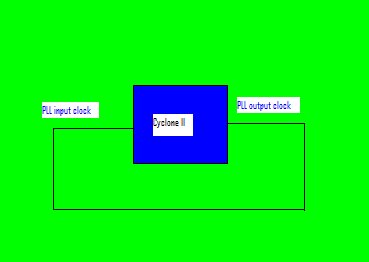
Can a PLL lock itself if I connect a PLL output clock to the PLL input clock on a PCB and both the PLL multiplication and division value is set to 1? I expected the answer is no, of course. But the curiosity kills sometimes. So, I went ahead and did the simple test.
I was using a Cyclone II device. Surprisingly, I saw the PLL locked output signal went high. However, the output signal frequency wasn't the expected frequency (10MHz). I probed at the PLL output clock (which was also connected to the PLL input clock signal), it showed about 420kHz.
So, what is the conclusion of this story? Nothing.
Saturday, September 02, 2006
Lattice Now Blogs!
It is always nice to see a FPGA vendor takes initiative to provide a platform for their knowledgable engineers to share their experience and knowledge. The good thing is that the knowledge shared is not only limited to Lattice products but all the vendors FPGA.
I know it is not easy for the writers as they now have one more repeatitive task in their long to-do list besides their daily jobs. Anyway, I hope they continue doing this! Bravo to all the writers!
Tuesday, August 01, 2006
Embed Tclet in Your HTML
Anyway, if I am not wrong (considering myself not a webmaster), it seems like HTML alone doesn't have the ability to let you do real-time programming stuff on your web browser, such as Mozilla Firefox or Internet Explorer. However, it can be done using a plugin.
There are many different types of plugins out there, but I choose to use Tcl applet or Tclet since I did some study on this language before. (If you've never heard of the Tcl/Tk language before, you can visit here.) I don't know how to embed a Tclet properly in blogspot. However, I manage to do it on another free site. This Tclet in this free site is to display all the gray code counter results in sequence after you have entered the number of bits your gray code counter is. I don't know how useful it is to you, but it is useful to me because I always forget how the gray code counter increments. Bear in mind that if you are a first-time user or viewer, you need to download and install the Tcl Web Browser Plugin for free. And, of course, it is SAFE to be installed in your PC. If you haven't installed it yet, you will see a blank square instead of the picture
on the left side here.It will be a bit long for me to describe how to embed Tclet in your HTML code here. The best source is the reference book that I show in here. Of course, you can look at the HTML code in the example above. Plenty of funky Tclet examples can also be easily found on web if you are interested to see others. Hope you like it.
Thursday, July 13, 2006
Save More Power In Handheld Devices

How to save more power when your CPLD device is in idle mode?
Use a very slow clock to reduce toggle rate? Partially disabling the logic inside the device? Well, why not powering off the device?
I came across this interesting article by accident and found it a simple yet smart idea to prolong the battery life of a portable handheld devices. In future, if I have the chance to design a portable product with interactive user interface, this idea will surely be the first one to cross my mind.
If for whatever reason, you have to use a FPGA in a battery-operated product, this article will sure help you more.
Sunday, July 02, 2006
OP-AMP Configurations Recall
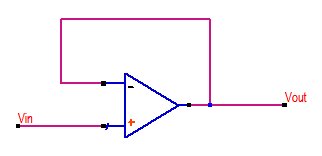
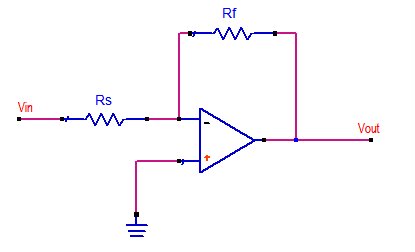
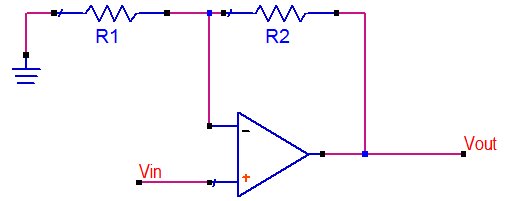
In my opinion, op-amp is like logic gates in analog world. You need op-amps to transfer your analog inputs into your desired analog outputs.
The following are some important notes for me, not for you, of course, :)!
Sunday, June 04, 2006
Embedded Logic Analyzer inside FPGA

There is no reason to doubt that most of the FPGA users like you and me have gone through some painful experiences wanting to know what is happening inside an FPGA. It is even more painful when you strongly believe your code is working fine and you don’t have any clue which part of the design is causing you sleepless nights. You keep on routing all the suspected internal signals to the very limited unused I/O pins of your FPGA and then probe and trigger them on your oscilloscope that usually has only four channels or LESS! Sad to say, the oscilloscope couldn’t help much in situation like this unless it is related to the signal integrity issue.
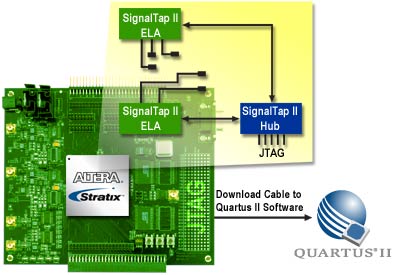
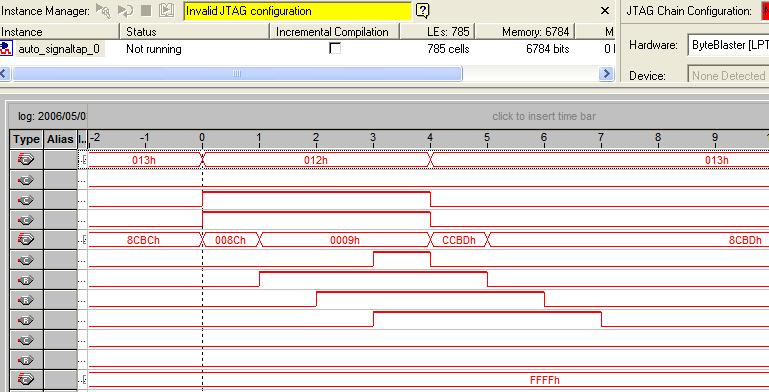
If you are lucky, you can have a logic analyzer instrument to sample a lot of signals for your analysis and verification. Well, if you are not, good news for you, you can insert an embedded logic analyzer inside your FPGA and it is totally licensed-free, at least for Altera FPGA users! The Altera Embedded Logic Analyzer tool named SignalTap II is FREE for use even you don’t purchase any software license from Altera. That means you can use your SignalTap II inside Quartus II Web Edition software for FREE provided that you install and enable the TalkBack Feature of Quartus II software.

The SignalTap II works almost like a logic analyzer equipment but at a very much smaller scale as it has very limited on-chip memory to store the sampled data. Other logic analyzer’s features such as Rising-Edge triggering, Falling-Edge triggering, Either-Edge triggering, Boolean triggering, Multi-Level triggering and others are also available in the SignalTap II tool. In fact, you can also instantiate up to 127 SignalTap II instances in your design, as long as it can fit in your chosen FPGA device. You can imagine each instance of SignalTap II is a small scale of logic analyzer equipment which also has an external trigger-in and trigger-out. And, the input of the trigger-in can come from other instances trigger-out or I/O pins or any internal logic signal. I think this is an advantage to the SignalTap II because a logic analyzer equipment trigger-in must come from one of your device I/O pins, isn’t it? Anyway, I rarely make use of the trigger-in, trigger-out and the multiple analyzer features because I prefer to monitor all my signals in just one analyzer. Why bother creating so many instances of analyzer where it doesn’t help saving you any logic and memory resource at all? One of the reasons is you need to have different acquisition clocks for the signals that you are interested to tap. It could also be you have different sample depth requirement for your acquiring signals and etc.
The purpose of this post is not to teach you using SignalTap II, but to make you aware of the availability of this tool if you haven’t come across or heard of this tool. My life as a FPGA user would have been a lot easier if I learnt to use this tool immediately after learning Quartus II. Instead, I only had the chance to pick up this tool after about one year being an Altera user. It is worth every moment to learn and pick up this tool as it makes your debugging process simpler and a lot faster. Unlike Xilinx’s ChipScope Pro, you don’t need to install the SignalTap II tool separately. It comes together with Quartus II and it is available after the Quartus II installation is done.
Last but not least, thanks to Altera that the SignalTap II is FREE!!
Friday, May 19, 2006
USB-Blaster vs Platform Cable USB

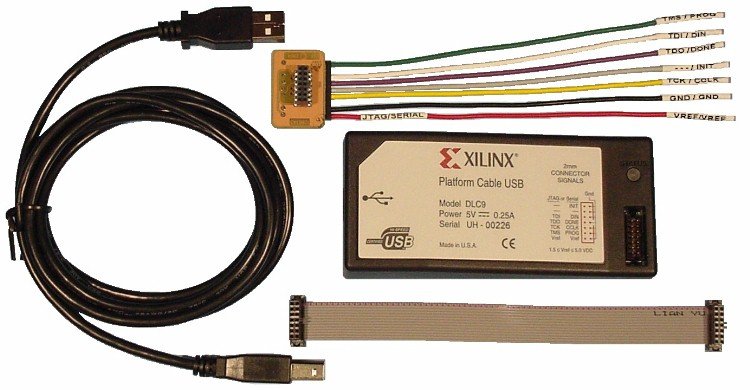
Both USB-Blaster and Platform Cable USB are the USB download cables provided by Altera and Xilinx, respectively. Most of time, the download cable is a necessity while developing and debugging your design in the FPGA. You need them to download the FPGA configuration bitstream through JTAG or Passive/Slave serial mode, to program the CPLD, to program the configuration device, to download your firmware into the soft processor and to tap the signals inside the FPGA through the FPGA embedded logic analyzer. Both of them are able to achieve all the above-mentioned purposes. But what is the main difference between them? The SELLING PRICE!!! The USB-Blaster costs USD$300 while the Platform Cable USB only costs half the price of the USB-Blaster, which is USD$149. This is really killing me because sometimes I need to use more than one download cable at the same time when dealing with multi-FPGA environment. Why can’t the Altera USB-Blaster at least cost the same like the Xilinx Platform Cable USB? In fact, Xilinx Platform Cable USB has even more features than USB-Blaster such as programming the configuration clock frequency. The USB-Blaster operates at USB full speed, which is 12Mbps, while the Platform Cable USB can operate at USB high speed!
Frankly speaking, the download cable should cost as cheap as possible by the FPGA vendors because they should be making money from selling their FPGA and CPLD devices, not from selling the download cables. Similar to the Quartus II and ISE web edition software tool, the download cable should just be a marketing tool to help promote the usage of FPGA or CPLD solutions! Imagine if I am a newbie who want to learn to use FPGA or CPLD on my own, it doesn’t make sense for me to buy a tool that is much much more expensive than a single low-cost FPGA/CPLD device.
Anyway, just for your reference, I also compare the cost of download cables that use the PC parallel port interface which are Altera ByteBlaster II, USD$150 and Xilinx Parallel Cable IV, USD$95. Once again, Xilinx is the winner when it comes to the price war. Is this the reason Xilinx being the market leader? Well, you know better.
/////////////////////////////////////////////////////////////////////////////////
// Disclaimer: All the price stated above are extracted from Altera Buy On-Line and Xilinx Online Store websites at the posting time and may change from time to time in future.
Friday, May 05, 2006
Convert Floating Point to String
1. Convert a string to floating point (atof)
2. Convert an integer to string (itoa)
3. Convert a string to an integer (atoi)
All the above functions come in very handy when you want to write your data to a text file. It is quite intriguing because itoa(), atoi() and atof() are provided but ftoa() are not. Unfortunately, many data are floating points in nature. Also, data that are larger than a 32-bit integer are usually represented as floating point data type. Anyway, many programming experts have already provided ftoa() solution on their websites. I believe it is not difficult to find one out there but I would like to have my very own one, too, as it is no harm trying. The C/C++ code is as shown below. I have tested it in the Microsoft Visual C++ compiler but I do not cover all the possible cases. So, use it on your own risk. It is not the best solution available for ftoa() but it certainly enough to meet my purposes. If you need one, I hope that it helps you, as well. If not, you can always write one for yourself.
////////////////////////////////////////////////////////////////
// my_ftoa.cpp
// date created: May 5, 2006
// author: http://fpgaforum.blogspot.com/
////////////////////////////////////////////////////////////////
#include <iostream>
#include <cmath>
using namespace std;
#define PRECISION_POINT 4 //Change this to display more or less precision point
void ftoa(float f, char* a, int point); //function prototype
void main()
{
float f = -1.23456;
char result[32];
ftoa(f,result, PRECISION_POINT);
cout << result;
}
void ftoa(float f, char* a, int point)
{
char buf_int [2]; //temporary buffer
char buf_d [16]; //to store the integral part, e.g. "-123" for "-123.456"
char buf_f [16]; //to store all the fraction part, e.g. "000123" for "1.000123"
char buf_nz [16]; //to store the non-zero fraction part, e.g. "123" for "1.000123"
int d= (int)(f); //integral part
float fp = (f<0) ? (d-f) : (f-d); //fractional part
int fp2int = fp*(pow(10,point));
int fpplus1 = fp*(pow(10,point+1));
if((fpplus1%10)>=5)
fp2int++;
strcpy(buf_int,"");
strcpy(buf_d,""); //clear the buffer, just to be safe
strcpy(buf_f,""); //clear the buffer, just to be safe
strcpy(buf_nz,""); //clear the buffer, just to be safe
if((d == 0) && (f<0) && (f>-1))
{
strcat(buf_d,"-");
itoa(d,buf_int,10);
strcat(buf_d,buf_int);
}
else
{
itoa(d,buf_d,10);
}
strcat(buf_d,".");
//looking for the leading zeros at the fractional part
if(fp2int == 0)
{
for(int i = 0; i < point-1; i++)
strcat(buf_f,"0");
}
else if(fp2int < (pow(10,point-1)))
{
for(int i = 0; i < point; i++)
{
int j = pow(10,(point-1-i));
if(fp2int < j)
strcat(buf_f,"0");
else break;
}
}
itoa(fp2int,buf_nz,10);
strcat(buf_f,buf_nz);
strcat(buf_d,buf_f);
strcpy(a,buf_d);
}
// The end
////////////////////////////////////////////////////////////////