Sunday, March 19, 2006

Any Replacement for Altera EPCS Devices?


I know there are already many websites which claim that Altera Serial Configuration Devices, a.k.a. EPCS devices, can be replaced by some lower cost devices. This post is just to give you more confidence on the availability of other cheaper configuration solution for Cyclone series and Stratix II FPGAs.

Altera introduced EPCS devices at the same time the Cyclone device is announced. Traditionally, the cost of the configuration devices (EPC family) for the Altera FPGAs are quite expensive, compared with the cost of the FPGAs. Most of the FPGA users want almost zero cost for the FPGA configuration solution since the configuration device is mostly a combination of a simple controller and a non-volatile memory that stores the configuration bitstream. Therefore, when the so-called "cheapest FPGA family", Cyclone FPGA was launched by Altera, Altera also took the initiative to provide a cost efficient configuration solution for the Cyclone FPGA. The traditional configuration solution for Altera FPGAs prior to Cyclone FPGA requires a simple controller to load the configuration bitstream from a non-volatile memory and write to the FPGAs during configuration. This kind of configuration methodolgy is called passive configuration. The passive configuration can be either in serial form or parallel form, depending on the available configuration modes of the selected FPGAs. Active Serial configuration was first available in Altera Cyclone FPGA family. During the active serial configuration, the FPGA will write out the Read Bytes instruction to the EPCS device and then continuously read the data out from the serial flash from the address 0x000000 until the FPGA is configured. The smart approach greatly reduces the configuration cost by putting the simple controller in the FPGA itself. That means, the configuration cost is only left with the non-volatile memory only. As a result, the SPI serial flash is chosen to store the configuration bitstream as it is low cost, low pin count and easy to control from the FPGA.


Nonetheless, engineers are usually very calculative people. The EPCS price list, if you check from the Digikey website, looks attractive at the first glance due to the sudden price drop on the configuration solution for an Altera FPGA. As time goes by, engineers realize that the EPCS device is none but a very standard serial flash. And, a standard serial flash should cost much lower than an EPCS device with the same memory capacity. I grab some data from the Digikey website. For an example, an EPCS1 device costs USD$3.50 but a ST’s M25P10-A serial flash from ST costs as low as USD$1.10, which is a huge difference! Imagine if you are just targeting the Altera smallest Cyclone device with slowest speed grade, EP1C3T100C8 (costs USD$10.70 quoted by Digikey), you will be paying too much for the configuration solution with EPCS1. Don’t you agree? M25P10 can equally do the job well at lower cost. Why not? Don’t bother whether they are exactly the same die or not. Both devices commands and timing specifications meet the active configuration controller (embedded inside Cyclone FPGA) requirement. Even the Quartus II programmer tool recognizes ST’s M25P10-A, M25P40, M25P16 and M25P64, as EPCS1, EPCS4, EPCS16 and EPCS64, accordingly. Perhaps there are still other cheaper alternative than ST’s M25P family.

In fact, the serial flash can do even more other than the configuration solution. You can use it to store the general-purpose data! You will always find out that the serial flash always has more than enough to store the configuration bitstream, especially if you turn on the configuration bitstream compression in the Quartus II software tool. So, don’t waste the rest of the memory in the serial flash, furthermore, they are non-volatile memory, which is often useful to keep some serial numbers, identification numbers, calibration data, tracking numbers, etc. And, the microprocessor program data! For an example, you can save the NIOS II ELF file in the serial flash and boot from the serial flash after power-up. For that reason, you may need to choose a serial flash with a bigger density, to store not only the configuration data, as well as the microprocessor program data. That way, you don’t need to source another flash device to store the microprocessor data. How big the serial flash required is determined by the code size of your program. Sometimes, instead of using an EPCS4 device just to store the configuration bitstream, I will choose an EPCS16 replacement (USD$ 16.25 from Digikey), ST’s M25P16 (USD$ 4.56 from Digikey) to be my Cyclone, Cyclone II or Straitx II FPGA configuration solution as well as the storage for my NIOS II ELF file, not to mention some general-purpose user data.

//////////////////////////////////////////////////////////////////////////////////////////////////////////////////////////////////////
Disclaimer: The information on this post is for informational purpose only. The author reserves the right not to be responsible for the topicality, correctness, completeness or quality of the information provided. Liability claims regarding damage caused by the use of any information provided, including any kind of information which is incomplete or incorrect, will therefore be rejected.

Saturday, March 04, 2006

What is Bandwidth?

Introduction to Bandwidth
According to Meriam-Webster Dictionary, the definition of bandwidth is
1: a range within a band of wavelengths, frequencies, or energies; especially : a range of radio frequencies which is occupied by a modulated carrier wave, which is assigned to a service, or over which a device can operate
2: the capacity for data transfer of an electronic communications system (graphics consume more bandwidth than text does); especially : the maximum data transfer rate of such a system

Anyway, the engineers always do not take the definition from the dictionary as a simple answer. So, what is bandwidth anyway? Engineers always mention about “bandwidth” when dealing with oscilloscope, probe, trace, connectors, etc. Sometimes, due to budget limitation, engineers complain about not enough bandwidth or limited bandwidth. So what is all this fuss about bandwidth?

Ever think about why the sampling oscilloscope with 50GS/s (GS/s: sampling per second) costs so much higher than the digital phosphor oscilloscope with just 1GS/s? The reason is very simple: the scope with 50GS/s has much higher bandwidth than the scope with 1GS/s. The bandwidth of the scope with 1GS/s is about 100MHz whereas the bandwidth of the scope with 50GS/s is 50GHz. May be examples can give you a better idea about bandwidth.

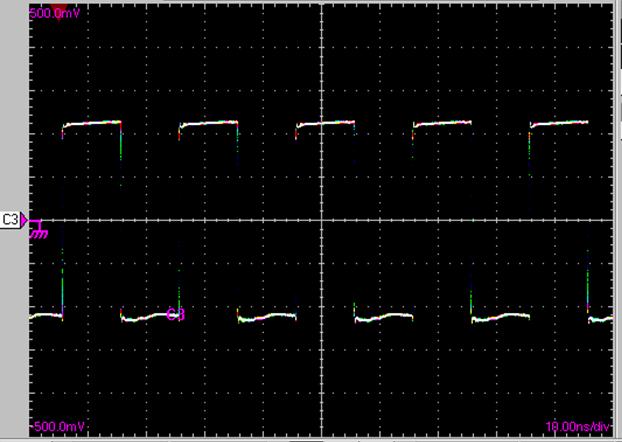
Below is a scope shot of a 50MHz square wave (generated by a FPGA device) captured on a sampling oscilloscope with 50GS/s.

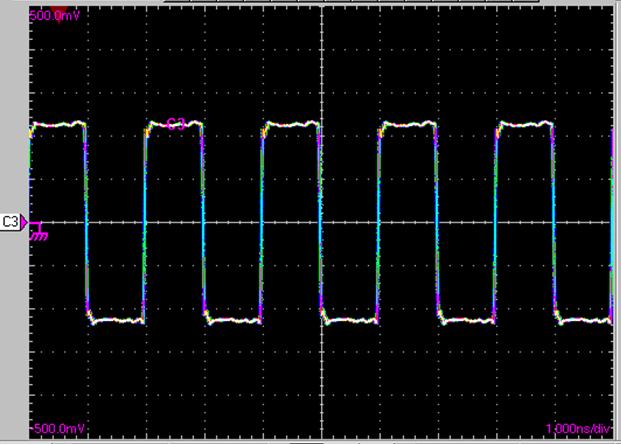
Below is a scope shot of the 50MHz square wave from the similar source as above, captured on a digital phosphor oscilloscope with 1GS/s.


As you can see, it doesn't seem to have much difference from both the captured scope shots of a 50MHz square wave, but sometimes looks can be deceiving. Let's check out the rising time of this 50MHz square wave. Again, both scope shots (zoomed in from the previous shots) are shown here for your reference.
Square wave rising-edge captured on a 50GS/s scope:


Square wave rising-edge captured on a 1GS/s scope:


So, as you can see, the rising-edge of the 50MHz square wave actually is within ps (pico-second)range, but the 1GS/s scope tells you that the rising-edge takes almost 1ns (nano-second). Anyway, this is still acceptable for 50MHz square wave.

Let's now measure 250MHz square wave (also generated by FPGA) on both the 50GS/s scope and 1GS/S scope.
This is measured on the 50GS/s scope:


This is measured on the 1GS/s scope:


Needless to say, the 250MHz square wave looks more like a trapezoidal wave on the 1GS/s scope.

How does 500MHz square wave look like on both scope? Here are the scope shots.
500MHz square wave measured on 50GS/s scope:


500MHz square wave measured on 1GS/s scope and it no longer looks like square wave:


Finally, this is how the 1GHz square wave looks like on the 50GS/s and 1GS/s scope, respectively. As you can see, the 1GHz not only looks more like a sinusoidal wave from the 1GS/s scope, its amplitude is also much smaller.


I believe all the above scope shots can prove to you the importance of bandwidth of a oscilloscope. Not only that, the bandwidth of a probe can also affect the results seen on the oscilloscope. The scope shot below is captured using a 4GHz FET probe and a SMA cable on a 7GHz storage scope. The signal measured is a 3.125Gbps signal generated by a Stratix GX FPGA device.

So, in conclusion, what are the considerations for the bandwidth? There are several rules of thumb when considering the bandwidth of an instrument.
1. Minimum bandwidth should be at least 5 times of the expected measured highest frequency.
2. If you are interested to measure the rise time, the minimum bandwidth should be 0.45/(rise time). Otherwise, the rise time that you have measured is inaccurate. For an example, look at the rise time of the 50MHz square wave captured above from different scopes.
3. Or, the minimum bandwidth is up to the 9th harmonic of the highest frequency, of course, higher the better. If you are not sure of what is 9th harmonic, then you can read my previous posts, History and Beauty of Sine Function and Building Square Wave from Fourier Series. That is the reason I said that the Fourier Series plays an important role in today's world and this is just one of the thousands examples or applications that have a close relationship with Fourier.

Tuesday, February 21, 2006

Building Square Wave from Fourier Series

As promised in my previous post, I would like to show how a square waveform can be built from the Fourier Series. I am using Tcl/Tk script to generate a periodic square wave from Fourier Series. The reason I am using Tcl/Tk language for this is because I have never practically done this before although I know it can be done. In case you haven’t heard about Tcl/Tk language before up to this point, you can read the previous post in this blog, The Interesting Tcl Language.

As you have known from my previous post, the periodic signals can be constructed using Fourier Series, which consists of summation of sine and cosine functions at frequencies which are harmonically related. The square wave function F(t) derived from Fourier Series is as follows:

F(t) = sin(t) + sin(3t)/3 + sin(5t)/5 + sin(7t)/7 + sin(9t)/9 + …
= ∑sin(nt)/n (n odd, 0< n <∞) (1.1)

It is too long to describe how the above function is derived. If you are interested to know how it is derived, it is not to difficult this information from the reference books or internet.

Since the square wave is luckily just constructed from summation of sine functions at different harmonic frequency, let’s display a simple sine wave using Tk first.

The Tcl/Tk source code for the above diagram is as follows. As you may agree, it doesn’t take many lines of complicated code to display a sine wave on your computer screen using Tcl/Tk script.

############################################
## sinewave.tcl
## date created : February 21, 2006
## author : http://fpgaforum.blogspot.com
############################################

wm focusmodel . passive
wm geometry . 460x360; update
wm resizable . 1 1
wm deiconify .
wm title . "Sine Wave Generator by FPGA FORUM"

label .msg1 -wraplength 4i -justify center -text "This generates a simple sine wave."
label .msg2 -wraplength 4i -justify center -text "http://fpgaforum.blogspot.com"
pack .msg1 -side top
pack .msg2 -side top

canvas .sinewave -bg black -width 450 -height 300
pack .sinewave

set coordList {}

#2*pi*f0 = w0 = 1/25
#fundamental frequency, f0 = 1/(25*2*pi)

for {set x 0} {$x<=450} {incr x} {
lappend coordList $x [expr sin($x/25.0) * 50 + 150]
}

eval .sinewave create line 0 150 450 150 -fill white -activefill blue
eval .sinewave create line $coordList -fill green -activefill red

##The end of sinewave.tcl
################################################


I purposely multiply the sine function result by a factor of 50 to amplify the sine wave. Otherwise, the sine wave would be too small.

The square wave, if constructed by the first 5 harmonics of sine functions looks like below. Of course, if you complain that this is not a square wave, then you are absolutely right. A perfect square wave is constructed when you have summed all the harmonics of sine functions according to the Equation 1.1.

The Tcl/Tk source code for generating the above square wave is as follows, and once again, the script doesn’t look much different from the one that generates a sine wave.

############################################
## squarewave.tcl
## date created : February 21, 2006
## author : http://fpgaforum.blogspot.com
############################################

wm focusmodel . passive
wm geometry . 460x360; update
wm resizable . 1 1
wm deiconify .
wm title . "Square Wave Generator by FPGA FORUM"

label .msg1 -wraplength 4i -justify center -text "This generates a square wave from the Fourier Series."
label .msg2 -wraplength 4i -justify center -text "http://fpgaforum.blogspot.com"
pack .msg1 -side top
pack .msg2 -side top

canvas .squarewave -bg black -width 450 -height 300
pack .squarewave

set coordList {}

#2*pi*f0 = w0 = 1/25
#fundamental frequency, f0 = 1/(25*2*pi)

for {set x 0} {$x<=450} {incr x} {
set y 0
set z 0
for {set N 1} {$N<=5} {set N [expr {$N + 2}]} {
set z [expr sin($x*$N/25.0) /$N* 50]
set y [expr $y + $z]

}
lappend coordList $x [expr $y+150]
}

eval .squarewave create line 0 150 450 150 -fill white -activefill blue
eval .squarewave create line $coordList -fill green -activefill red

##The end of squarewave.tcl
#####################################################


If the N is 101, then you can see that an almost perfect square waveform is displayed using the squarewave.tcl script. And, it is not too difficult for you to imagine that a perfect square wave will be generated if you keep on increasing the value of N, which is also the Nth harmonic sine wave from the fundamental sine wave frequency.

You may now feel curious about the real applications of the Fourier Series after reading this post. In my next post, I will tell you one real application that has the connection with what I have brought out in this post.

Sunday, February 19, 2006

History and Beauty of Sine Function


Still remember when was the first time you learn about sine function? Still remember how the sine function was derived when you were in the secondary school? I first learnt about the sine function from the trigonometry chapter at 14 years old if I remember correctly. 10 years later, I almost forgot that the sine function introduction was from a right-angled triangle. Sine function of the angle A (not the right angle) in a right angular triangle is the length of the side opposite to the angle A divided by the length of hypotenuse, which is the longest side of a right-angle triangular. Cosine function of the angle A, on the other hand, is defined as the length of the adjacent side of the angle A divided by the length of hypotenuse. From the above explanation, it is not too difficult to think that cosine function is an extension from the sine function. Perhaps this is the reason why cosine function is named as co-sine function.


Everything looks so simple when I was beginning to learn the sine and cosine functions. Never could I have thought that these simple functions have so much influence on today’s mankind history. No kidding! What would happen if there was no sine function nowadays? The influence of the sine function is too much way beyond anyone imagination.


An example of the importance of Sine function is shown obviously in Fourier Series. Fourier Series was discovered by a French mathematician, Jean Baptiste Joseph Fourier (1768-1830, one of the French Revolution contributors) when he was studying and analyzing the heat flow in a metal rod. Therefore, the Fourier Series was named in honor of him. According to the Fourier Series, a periodic function can be represented by an infinite sum of sine or cosine functions that are harmonically related. For an instance, a square wave, which doesn’t seems to be any sinusoidal at all, can be represented by a Fourier Series. (If I have the time, I would like to prove it to you in graphics next time.) If you think that this is an easy statement, then you are totally wrong. Fourier Series as well as Fourier Transform which bears his name, are considered among the greatest discoveries in scientific and engineering discipline.


There are too many periodic motions or waveforms around us all the time. To name a few, signals transmitted by the cell phone base-station, television and radio stations are sinusoidal and periodic. The alternating current (a.c.) power sources generate voltages and currents are in sinusoidal form. Function or Signal Generators generate different kind of periodic waveforms in your laboratories. The generation and analyzing of the periodic motions or waveforms are made possible through Fourier Series. Anyway, the Fourier Series will not be possible if there was no Sine function before Joseph Fourier.

Isn’t it amazing? Why sinusoidal shape matters? Why not square, triangular, or circle? This is really intriguing.

Monday, February 06, 2006

The Interesting Tcl Language


People pronounce Tcl as "Tickel". Tcl means Tool Command Language. Usually, you see Tcl paired with its young brother, Tk. Tk is the Tcl toolkit for building graphical user interfaces.
I was first introduced by this cool Tcl language about 3 years ago when I tried to find a solution to automate the compilation of Quartus II overnight and during the weekend. Basically, I had about twenty different Quartus II projects to compile and each of them took a few hours to complete due to the large logic usage and strict timing requirement inside the designs. If I didn't automate this process, I would be wasting my time to do the manual push-button compilation after every one or two hours of compilation, which was kind of stupid. So, that was my first purpose of using the Tcl language.

However, soon after that, I found out that the Tcl language is not merely a scripting language that is limited for automation process. It can do much more than that, such as file processing, easy interface with the PC serial port without any external DLL, easy construction of GUI, interface with a DLL written by you or others, etc. Besides that, I also found out that most of the FPGA tools like Quartus II, ISE and famous third-party simulation tool, ModelSim, provide the API and platform for you to command them in Tcl language.

One of the reasons people use Tcl language is that the script written in Tcl language works regardless of the operating system used. It saves the hassle of providing the software in different versions just to support different OS.
If you never heard about the Tcl and are interested with this Tcl language, you can go to ActiveState to download the ActiveTcl software, and it is freely distributed. There are many Tcl application examples that you can easily download from the website for reference. If you would like to know even more details about this cool language, you can read the Practical Programming in Tcl and Tk written by Brent B. Welch, Ken Jones with Jeffrey Hobbs. This Tcl/Tk bestseller comes with a CD-ROM that includes all the examples used in the book and also the ActiveTcl software which may have been outdated. This book (fourth edition) has been my Tcl/Tk bible since I start using Tcl and Tk and it still is.

Saturday, February 04, 2006

The Art of Prototyping


There is another huge advantage of using FPGA which I had left out in my previous post. In fact, this is one of the significant reasons the engineers are using the FPGAs. Seeing is Believing! Many IC Designers design their "designs" with simulation tools that cost them hundreds of thousand or even millions dollars, but sometimes all the simulation results before the first silicon is still not enough. So, the IC Designers work with the engineers who are familiar with the FPGA devices and tools to create a prototype for their designed IC using the RTL codes written by them. The prototype can reduce a lot of risk on the IC designed because if there is any bug found on the RTL codes, it can still be fixed, re-compiled on the FPGA tool and then verified on the FPGA again within a short period of time. As I told you in my previous post, the FPGA can be re-configured with any new design easily. In my working experience, the most impressive prototype that I had seen so far is the prototyping of a RF wireless chip in a Xilinx FPGA. Of course, the Xilinx FPGA only prototypes the digital portion of the RF chip, such as the microcontroller, JTAG (Joint-Test-Action-Group), etc.

The prototype can at least verify the functionalities of the new IC designed. But then you may ask, what is the difference between the FPGA prototype and the final product IC? Timing. It is difficult to match the timing between the FPGA and the ASIC (short form for the Application Specific IC, usually the IC designed has a specific application, such as graphics chip, USB device chip, etc) due to the different architectures inside the ASIC and the FPGA. Anyway, even if the FPGA cannot run as fast as the targetted ASIC frequency, it doesn't stop people from prototyping their final product in FPGA unless their final product is an analog device. You may also be curious, if that is the case, why don't the IC Design companies just sell their "ASICs" designs in the FPGAs? Well, the reason is simple, the cost is different. If they have the confidence that many people will love their ICs and their ASICs is going to make them a lot of money, then it is certainly very much more cost-efficient to go for ASICs. Two three years ago, FPGA vendors such as Altera and Xilinx have rolled out many low cost FPGAs such Cyclone series and Spartan series FPGAs. These low cost FPGAs certainly worth considered if the designs do not target very high frequency and high performance. However, if you are targetting the high-end FPGAs such as Stratix series or Virtex series FPGA, then you might consider selling your product with volume in ASIC because the high-end FPGAs are very expensive! Or, you may consider Altera HardCopy II as Altera promises "seamless" migration from FPGA to ASIC at NO pain!

Friday, January 27, 2006

Everybody Loves Field Programmability


If you have the choice to buy one product at the same cost, one has the upgrade ability while the other does not, most likely you will choose the former one. This is the current trend of the electronics product, which includes the big-market consumer products. More and more electronics product designers intend to put in some effort to provide the field programmability platform for their products.

Nowadays, due to the nature of the highly-competitive business world, time-to-market becomes utmost critical. If you can rollout your products faster than your competitors, your products are likely to be emerged as the product winner because your product gains the market faster than anyone else. Although your product is rolled out with the fundamental features required, the users can upgrade your product with the latest features and firmware later after purchase. This is possible if your product has the field programmability feature and this can be done using a FPGA or even CPLD. Cool huh?

Due to this reason, don’t forget to check if the electronics stuff that you are interested provides any feature upgrade ability. If you already have purchased some electronics stuff with the feature upgrade ability, then don’t miss out the latest version of features for your electronics stuff. The reason is simple; you have already paid for all the future upgradeable cool features from the moment you paid for it. Another reason you should upgrade to the latest features is the current features may have bugs and therefore don’t work well. Anyway, when you find out that the latest features fix the previous version bugs, don’t blame the engineers because the stakes is too high, the schedule is so tight and the time-to-market is getting shorter and shorter!

Actually, the field programmability is not only limited to consumer products. A very good example of the importance of field programmability is for the base station used in cell-phone communication. Base station is the radio transmitter and receiver which transmits and receives all of our calls to or from our cell-phones in a particular area (which is also called cell). We all realize that cell-phone technology upgrades very fast and the base stations just have to catch up with the latest technology used. Imagine what would happen if the base stations don't have the field programmability? I believe it would cost the telecommunication companies a lot just to keep their base stations updated with the latest features in the cell-phone technology! Just think about the base stations located high on the mountains you will know what I mean.

If you are still not sure with what I am trying to bring out here, there is a good and simple reference design for you to read, of course, provided that if you are interested to know more. This reference design targets the Altera Stratix FPGA which has the remote update configuration feature.

That’s why everybody loves field programmability!

Thursday, January 26, 2006

Soft Processor in FPGA


If you are new to FPGA, your might wonder what is the advantage of using a soft embedded processor in a FPGA. Examples of the famous soft processor in the FPGA are Altera NIOS II and Xilinx MicroBlaze. Why not using a dedicated microprocessor such as Microchip PIC microcontrollers, Motorola 68000, ColdFire or others? There are quite a number of reasons for this. Below are some that I can quickly think of.

First, you can configure as many I/Os as you desire in a FPGA as long as the FPGA chosen by you can provide that. For an example, most of the dedicated microcontrollers have the most 40 I/Os, but with a FPGA, you can have as many as 300 I/Os or even more if you are willing to pay more, and all of the I/Os can be controlled through the soft-core processor programmed in the FPGA.

Second, you can design your very own customized Intellectual Property (IP) inside the FPGA to interface with your processor. Of course, your IP would reside inside the same FPGA, too. The IP can be written in Verilog, VHDL or vendor-specific hardware description language such Altera AHDL or Xilinx XDL. For an example, in my previous post, I mentioned that I had done USB device IP cores inside FPGA. In fact, these IP cores interface with the soft-core processor inside the FPGA. The reason for having a separate IP core for some dedicated function is to have a higher performance, such as USB High Speed transfer (480Mbps) with PC. A dedicated controller alone might not act as fast as an IP core in a FPGA. For that reason, I never see any dedicated controller that supports USB High Speed transfer, at least not as far as I know. Most of the dedicated controllers only support USB transfer up to 12Mbps, which is actually the USB Full Speed transfer.

By now, you may ask, why not creating the whole design in a FPGA without the soft-core processor? Actually you can. But there are cases that you want the simplicity of writing part of your design using C/C++ code, especially those design portions that require massive processing power. See my previous post . Most of the time, using a processor helps reducing your design time and save your FPGA cost, because less logic is required if you design is relatively complicated.

Third advantage of using a soft processor in a FPGA is, you can increase your operating frequency as high as the timing requirement in your design is met. For most of the dedicated controller, you have to follow the frequency specification.

Well, enough has been said for the goods of the FPGA. Is there anything good about the dedicated microcontroller? Cost, of course! Every penny counts, you have to pay for the cool features of a FPGA!

Wednesday, January 25, 2006

C or HDL in FPGA?


There are always two options to create one design in FPGA, first through HDL and second through C language. Many FPGA beginners always ask me whether they should design their IPs in HDL or C in the FPGA. HDL, a.k.a Hardware Description Language, refers to the well-known verilog HDL or VHDL language whereas C in this article refers to the common C or C++ programming language.

If your IP needs very fast performance, it is best to design it with HDL because the design is in RTL (Register Transfer Level) and you know exactly how many clock cycles taken to transfer data among all the registers. You also define and create all the state machines needed in your IP. Using HDL, you can create as many parallel processing as possible to improve your design performance. The downside when designing with the HDL is it always takes more development and debugging time than designing with the C. Sometimes, simulation is required to make sure the HDL design behaves as expected at the targeted operating frequency.

You probably learn C language earlier than HDL in your life. So, needless to say, you most probably feel more comfortable when creating your IP in C. Besides, it always takes less development time and much easier to debug as most C compiler provides a user-friendly debugging platform. The disadvantage for C is that you can’t control much about the timing performance. You usually don’t know or you don’t even bother how much time taken to execute one function in your design. The most critical downside of C language is that you can’t do parallel processing. Everything works in serial with C, except when the DMA (Direct Memory Access) is called to work. The most you can do with C is code optimization and use the DMA as frequent as possible.

Although there are pros and cons for both design entry with HDL and C, you can actually combine both in your IP to optimize your IP performance as well as to shorten the time taken for your IP to market. For the design portion that needs critical performance, design it with HDL. On the other hand, for the design portion that requires many processing, design it with C to save some development time and also your limited logic resource in the FPGA.

In the digital world, many people refer the engineers who do their designs using HDL as Hardware Engineer whereas the engineers who write C code as Software Engineer. Many hardware-software integration issues appear due to the clear line drawn between the Hardware Engineer and Software Engineer. Due to this reason, I hate to call myself as either one of them because for me, both are just equally important.

There is a very good article that talks about the issues raised when integrating hardware and software. Feel free to read the interesting “When Hardware Met Software” from Xilinx. This is the reason I love Xilinx, they keep on publishing interesting and useful articles for public for FREE!

Tuesday, January 24, 2006

Communication Link between FPGA and PC


Nowadays, PC has become the most common platform for everybody. You use PC to store your personal data, business statistics, financial documents, digital photos, songs, etc. You also use PC to communicate daily with your family and friends through emails and messengers. For that reason, I think it is fair to say that the communication link on an embedded system with PC becomes more critical now than ever. One common example, almost all of the every recent generation of cell-phones can be connected to PC through USB.

If you have a FPGA on an embedded system, you find that at times you want your embedded system to talk to the PC. Luckily, a lot of Intellectual Properties (IP) have been designed by great FPGA companies such as Xilinx and Altera to build the connection between the FPGA and PC. Therefore, if you want to save yourself hassle from designing your own IPs, you can just buy those needed IPs from the targeted FPGA companies. Of course, these IPs are not for free but big companies certainly afford to buy the licenses for these IPs.

I personally have the experience to design and implement the communication links between a FPGA and a PC. I have designed the IP (using verilog) in the FPGA to talk to the PC via Parallel Port, Serial Port and most recently, the popular USB port. It is an wonderful feeling when I successfully communicate with the PC USB port from low-speed (1.5Mbps) to full-speed (12Mbps) using only a Cyclone FPGA and later HIGH-SPEED (480Mbps) using a Cyclone FPGA with the help of a NET2272 chip! The most difficult part when getting started is to enumerate the USB successfully. If you are already able to create an IP that can enumerate the USB device successfully with a FPGA, you are almost half way through. It is not easy but it is certainly not as difficult as you may imagine.

Monday, January 23, 2006

Hello World!

Hello World from fpga forum!

Please bookmark this forum as more interesting posts will be published for you soon!